Want to make life even simpler? Sign up for both Auto Bank Pay and Paperless Web Billing. With a couple of quick switches, you can simplify your monthly routine and cut down on clutter.
Set It and Forget It with Auto Bank Pay
Never worry about missing a due date again. When you sign up for Auto Bank Pay, your bill is paid automatically—no stamps, no reminders, no stress.
Why you’ll love it:
-
Your payment is withdrawn automatically on the date you choose
-
No late fees or forgotten payments
How to sign up for Auto Bank Pay:
- Go to estatement.alliancecom.net/ebill and register or sign in
-
Enter your information for Auto Bank Pay.
-
If we receive your information before the 20th of the month, Auto Bank Pay will start with your next bill.
Ditch the Paper and Sign up for Paperless Web Billing
Say goodbye to paper clutter and hello to easy access. When you switch to Paperless Web Billing, you’ll receive an email each month letting you know your bill is ready to view—anytime, anywhere.
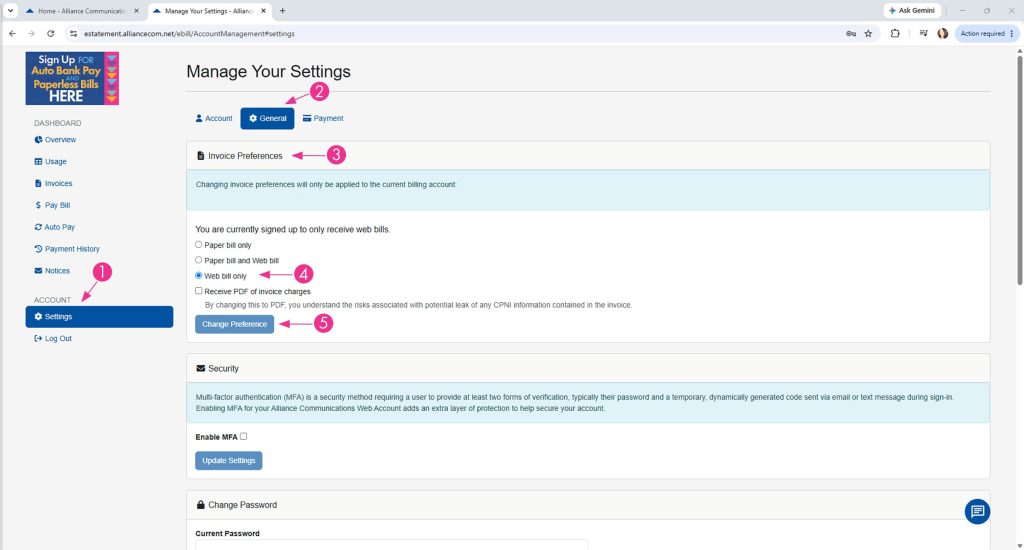
How to sign up for Paperless Web Billing:
Go to estatement.alliancecom.net/ebill and register or sign in.

Step 1. Click the Settings.
Step 2. Select the General tab.
Step 3. Locate Invoice Preferences.
Step 4. Choose Web Bill Only.
Step 5. Click Change Preferences.